Skip to contentSkip to sidebarSkip to footer


Complete Office Setup for Singapore SMEs: What You Actually Need
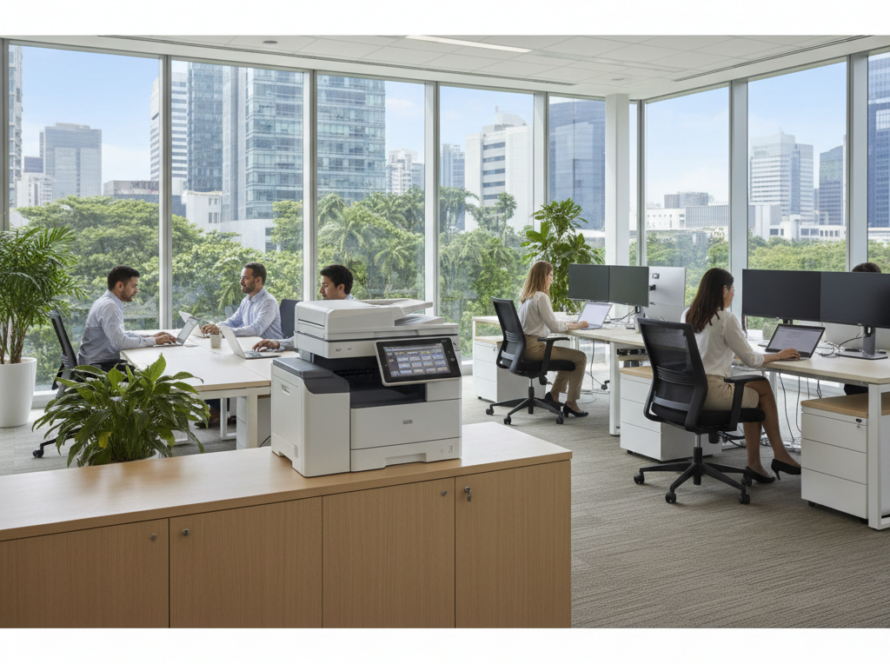
Whether you are opening a new office, relocating, or expanding your team, getting a complete office setup right from the start saves time, money, and frustration. For Singapore SMEs, the challenge is not just buying the right equipment — it is making sure everything works together, arrives on time, and is supported when something goes wrong. This guide covers the key IT hardware and infrastructure components that most Singapore businesses need, and how to approach procurement sensibly.
Quick Summary
- A complete office setup for a Singapore SME typically includes workstations or laptops, networking equipment, printers, displays, and UPS units.
- Structured planning prevents costly mistakes such as incompatible hardware or insufficient network capacity.
- Working with a single IT supplier simplifies procurement, delivery, and ongoing support.
- Groovit supplies IT hardware and infrastructure for Singapore businesses of all sizes.
Start With a Clear Inventory of What You Need
Before purchasing anything, list out your requirements by category. How many staff will be working in the office? Will they use desktops or laptops? Do you need a server or will you rely on cloud storage? Is there an existing network infrastructure, or are you starting from scratch? Answering these questions early prevents over-ordering or under-specifying equipment that you will need to replace within a year.
For most Singapore SMEs, a practical office IT setup covers the following categories:
- End-user computing: desktops, laptops, or thin clients
- Networking: routers, managed switches, and wireless access points
- Printing and scanning: multifunction printers or dedicated laser printers
- Displays and peripherals: monitors, keyboards, mice, and headsets
- Power protection: uninterruptible power supplies (UPS) for critical equipment
- Storage and backup: NAS devices or external drives for local backup
- Cabling and structured wiring: Cat6 cabling, patch panels, and cable management
Workstations and Laptops: Matching Specs to Job Roles
Not every staff member needs the same hardware. Administrative staff handling documents and emails have different requirements from designers, engineers, or finance teams running heavy applications. Over-specifying wastes budget; under-specifying creates performance complaints within months.
A practical approach is to define two or three hardware tiers based on job function, then standardise within each tier. This also simplifies future replacements and IT support, since your team is not managing dozens of different configurations.
For Singapore offices, both desktops and laptops are common. Desktops generally offer better value per unit of performance and are easier to service. Laptops offer flexibility for hybrid work arrangements, which remain relevant for many Singapore businesses post-pandemic.
Networking: The Foundation of a Functional Office
A poorly planned network is one of the most common causes of productivity loss in a new office. Slow Wi-Fi, dropped connections, and insufficient switch ports are problems that are far easier to address during setup than after staff have moved in.
For most Singapore SMEs, a reliable office network includes:
- A business-grade router connected to your fibre broadband line, with proper firewall and VLAN support if needed.
- Managed switches to connect wired workstations, printers, and IP phones. Managed switches allow you to prioritise traffic and segment your network as the business grows.
- Wireless access points positioned to provide consistent Wi-Fi coverage across the office. Consumer-grade routers with built-in Wi-Fi are rarely sufficient for an office environment with multiple concurrent users.
If your office spans multiple floors or a large floor plate, you may need multiple access points with a centralised controller. Plan cabling routes and power outlet positions before renovation works are completed — retrofitting structured cabling after fit-out is significantly more disruptive and expensive.
Printers and Multifunction Devices
Despite the move towards digital workflows, most Singapore offices still require printing and scanning capability. Multifunction printers (MFPs) that handle printing, scanning, copying, and sometimes faxing are the practical choice for most SMEs.
Key considerations when selecting office printers include print volume per month, whether colour printing is required, paper size requirements, and whether the device needs to integrate with your document management or cloud storage system. Laser printers generally offer lower cost per page for high-volume environments compared to inkjet alternatives.
Displays, Peripherals, and Ergonomic Accessories
Monitors, keyboards, mice, and headsets are often treated as afterthoughts, but they directly affect staff comfort and productivity. For office setups, 24-inch to 27-inch Full HD or QHD monitors are common choices. Dual-monitor setups are increasingly standard for roles involving data entry, finance, or multitasking.
If your team uses video conferencing regularly — which is common in Singapore’s hybrid work environment — investing in quality headsets and webcams reduces meeting friction and presents a more professional image to clients and partners.
UPS and Power Protection
Singapore’s power supply is generally stable, but brief outages and voltage fluctuations do occur. For servers, NAS devices, and critical workstations, an uninterruptible power supply (UPS) provides a buffer that allows equipment to shut down safely or continue operating through short interruptions. This protects both hardware and data.
UPS units are often overlooked in initial office setup budgets. Including them from the start is far more cost-effective than dealing with data corruption or hardware damage after an unexpected power event.
Why Working With One IT Supplier Makes Sense for SMEs
Sourcing IT hardware from multiple vendors — one for laptops, another for networking, another for printers — creates coordination problems. Delivery timelines differ, warranty claims go to different parties, and when something does not work, each vendor points to another.
For Singapore SMEs without a dedicated IT department, working with a single IT supplier in Singapore for your complete office setup simplifies the entire process. One point of contact for procurement, delivery, and support means less time spent managing vendors and more time focused on your business.
Groovit supplies IT hardware and infrastructure for Singapore businesses, including workstations, networking equipment, printers, UPS units, and peripherals. We work with SMEs, clinics, schools, and offices across Singapore to help them plan and execute practical IT solutions for Singapore SMEs without unnecessary complexity.
Planning Your Office Setup: A Practical Checklist
- Define headcount and job roles before specifying hardware
- Confirm your broadband provider and connection type before selecting networking equipment
- Plan structured cabling before renovation or fit-out is completed
- Standardise hardware tiers to simplify support and future replacements
- Include UPS units for servers and critical equipment in your initial budget
- Confirm warranty terms and local support availability for all hardware purchased
- Allow lead time for hardware procurement — some items have longer delivery windows
Speak to Groovit About Your Office Setup
If you are planning a new office, expanding an existing one, or replacing ageing equipment, Groovit can help you work through the requirements and source the right hardware for your business. We supply IT equipment and infrastructure to Singapore SMEs and can assist with procurement planning, delivery, and basic setup support.
Contact us to discuss your requirements:
- WhatsApp: +65 8088 5805
- Email: [email protected]
- Website: groovit.sg