Skip to contentSkip to sidebarSkip to footer


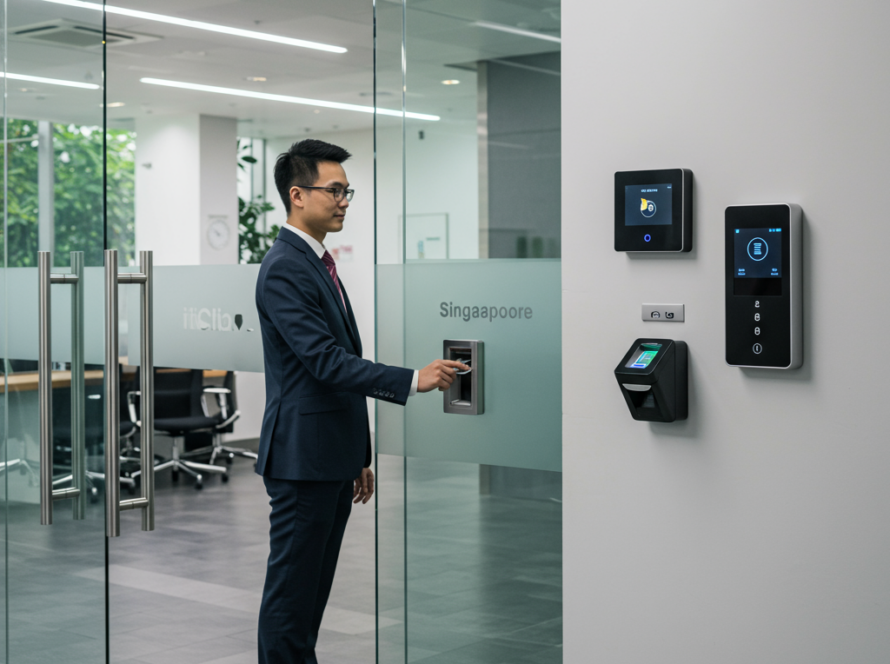
For most Singapore SME offices, the right choice for biometric door lock installation is a Hikvision face recognition terminal with a built-in card reader, wired to a fail-safe magnetic lock, a push-to-exit button and an emergency break-glass unit. Face recognition is touchless and fast, and hard for staff to share the way they share cards or PINs. The card fallback covers visitors, contractors and the occasional staff member the camera struggles with. The trade-off is cost: a face terminal costs more than a basic fingerprint reader, and it needs a mounting position away from strong backlight. If your budget is tight and you have under 20 staff on a single door, a fingerprint-plus-card unit is the sensible step down.
This guide covers the shortlist we recommend, the specifications that matter and the ones you can ignore, and what to confirm before you order.
What does biometric door lock installation for offices in Singapore actually involve?
A biometric office door system is more than the reader on the wall. A complete installation normally includes:
- The terminal: a face, fingerprint or card reader that identifies the person.
- The lock: usually an electromagnetic (maglock) lock on glass or timber doors. Some setups use an electric strike or drop bolt instead.
- Exit hardware: a push-to-exit button on the inside and an emergency break-glass release.
- Power: a 12V power supply with battery backup so the system behaves predictably during an outage.
- Cabling and network: an Ethernet connection so you can manage users and pull attendance logs from a PC or client software.
Most building management offices in Singapore will ask to see the lock type and fire-release arrangement before work starts. Plan for that conversation early. For a broader view of door access options, our access control system Singapore guide explains how standalone terminals compare with controller-based systems.
Which Hikvision models should an SME shortlist?
Hikvision’s MinMoe range is the most practical starting point for small and mid-sized offices. It covers face, fingerprint and card authentication in compact, standalone terminals. Exact model codes change as Hikvision refreshes the range, so treat the table below as a guide to categories, and confirm current models at quotation.
| Terminal type | Authentication | Best suited to | Typical market price band (general, unit only) |
|---|---|---|---|
| Face recognition terminal (MinMoe DS-K1T34x/DS-K1T67x series) | Face, card, PIN; some with fingerprint | Main office entrance, 20 to several hundred users, hygiene-conscious sites such as clinics | Roughly S$400 to S$1,200 |
| Fingerprint terminal (DS-K1T8xx / DS-K1A series) | Fingerprint, card, PIN | Small offices, server rooms, budget-led single doors | Roughly S$200 to S$500 |
| Card reader with controller (DS-K1100/DS-K2600 series) | Card, optionally PIN | Multi-door sites, high-traffic doors, visitor-heavy reception | Varies by number of doors |
These are general market ranges before installation, locks and cabling, not Groovit quotations. Our Hikvision access control Singapore article goes deeper into the product families.
Why we lean towards face plus card
Fingerprint readers work well. The weak point is real Singapore conditions: sweaty hands after a walk from the MRT, plasters, and staff with worn fingerprints, such as cleaners or lab workers. All of these push up false rejections. Face terminals avoid most of that, and the card fallback handles everything else. Our face recognition door access guide and fingerprint door access guide compare the two in detail.
Which specifications actually matter?
Focus on these when comparing terminals:
- User and face capacity. Check the face, fingerprint and card limits separately. A unit rated for 1,500 faces is plenty for most SMEs, and it leaves room to grow.
- Liveness / anti-spoofing. Prefer terminals with deep-learning face recognition and anti-spoofing that can reject printed photos and phone screens.
- Mounting environment. Indoor units should not face glass shopfronts with strong afternoon sun. For semi-outdoor doors, look for an IP65 rating.
- Network and power. TCP/IP connectivity is essential for central management. PoE support simplifies cabling where your switch supports it.
- Fire-alarm integration. The lock must release when the fire alarm triggers. Fail-safe maglocks connected to the building fire panel are standard practice.
- Time attendance export. If HR plans to use the logs, confirm the terminal exports clean reports, or integrates with your attendance software.
Which specifications can you ignore?
Some headline numbers matter far less than the brochure suggests. The first is a recognition speed under 0.2 seconds. Every modern terminal is fast enough, and the door’s opening speed is the real bottleneck. Huge capacities of 50,000 or more faces are irrelevant for a 40-person office. Mask detection was popular a few years ago, but it is rarely a deciding factor now. Larger touchscreens look premium yet add little for daily entry. Spend the difference on proper locks and a battery backup instead.
What goes wrong with office biometric installations?
The terminal is rarely the problem. Installation details are. The usual faults we see discussed across the industry include:
- Undersized or misaligned maglocks on frameless glass doors. These leave gaps or let the door be forced.
- No battery backup, so a brief power trip either locks everyone out or leaves the door open.
- Poor terminal height or backlight, which causes repeated face recognition failures.
- Weak data handling. Biometric templates are personal data. The PDPC’s guidance under the PDPA expects organisations to notify staff, limit purpose and protect the data, and to consider less intrusive alternatives where appropriate. Offering a card option helps here.
- Terminals left on a flat office network with default passwords. Put access control devices on a separate VLAN behind your firewall. Our IT security guide for Singapore SMEs covers this.
Should you pair door access with CCTV?
Usually, yes. A door log tells you which credential opened the door. A camera tells you who actually walked through and whether anyone tailgated behind them. A single Hikvision camera covering the entrance is a modest add-on, and it closes the most common gap in office access control. See our commercial CCTV installation guide if you are planning both together.
What should you check before ordering?
Before you sign a quotation, confirm the following:
- Door type and frame: glass, timber or metal, single or double leaf. This decides the lock and the brackets.
- Building approval: whether management needs drawings or a fire-release confirmation.
- Headcount and growth: current users plus visitors and contractors over the next two to three years.
- Who administers it: someone in-house must be able to add and remove users the same day staff join or leave.
- Network point and power at the door, or the cabling cost to get them there.
- PDPA notice and consent wording ready for staff before enrolment.
- Warranty and support: who you call when the lock fails at 8.30am on a Monday.
Groovit installs and supports door access across Singapore offices. Business accounts are invoiced on 30 day terms, and ready-stock items ship within 1-3 business days. Every installation is quoted per site after we understand your door and layout. If you prefer a contractor to manage the whole project, read our office door access system contractor guide. You can also browse hardware in the Groovit shop.
Upgrade your office entry with access control. Contact Groovit Pte Ltd for suitable options. WhatsApp us at +65 8088 5805 or email [email protected] with your door photos and headcount, and we will recommend a setup that fits.
Frequently Asked Questions
Is face recognition or fingerprint better for an office door in Singapore?
For most offices, face recognition with card fallback is better. It is touchless, fast and unaffected by sweaty or worn fingers. Fingerprint terminals are cheaper and suit small single-door offices.
Does a biometric door lock comply with the PDPA?
It can, provided staff are notified of the purpose, the data is protected and kept only as long as needed, and less intrusive options such as cards are considered. The PDPC publishes guidance on biometric data use.
What happens to a biometric door lock during a power cut or fire?
A properly installed system uses fail-safe maglocks that release on fire alarm signal. A battery-backed power supply keeps the door operating predictably through short outages.
How much does a Hikvision biometric terminal cost?
As a general market guide, fingerprint terminals sit roughly at S$200 to S$500. Face recognition terminals sit roughly at S$400 to S$1,200, before locks, cabling and installation, which are quoted per site.